- Página de inicio /
- Electrónica /
- Computer Accessories /
- Computer Components /
- Single Board Computers /
- ELECFREAKS microbit Retro Makecode Arcade for...
0 ratings





Nº de artículo:
255557825
ELECFREAKS microbit Retro Makecode Arcade for STEM Education, Micro:bit Joystick Programming Learning Machine Supports Remote Control and Creat
Nº de artículo:
255557825
BOB 295
Price Details
Excluding Shipping & Custom charges ( Shipping and custom charges will be calculated on checkout )
*All items will import from Estados Unidos
En stock
 Importado de la tienda USA
QTY:
Haz tu pedido ahora y recíbelo por ahí Viernes, Octubre 09
Secured transaction
Ubuy works hard to protect your security and privacy. Our advanced payment security system ensures confidentiality by encrypting your information during transmission using AES (Advanced Encryption Standards) and SSL (Secure Socket Layer) protocols. Your payment details are 100% secure as we do not share your payment details with third party sellers.
Our Top Logistics Partners


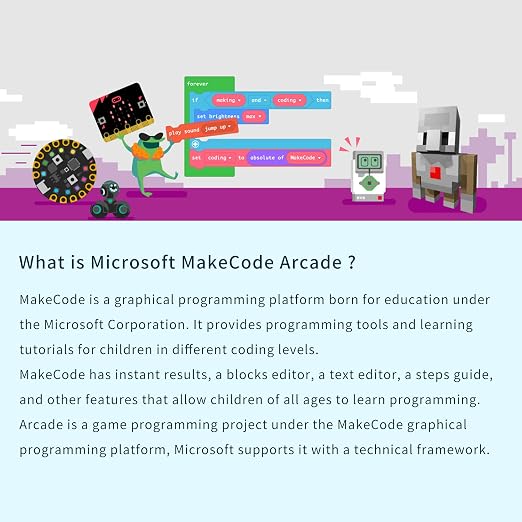
Through Graphical Programming, it is easier for kids to understand and code.

Fast
Shipping

Free
Return*

Secure Packaging

100% Original Products

PCI DSS Compliance

ISO 27001 Certified



Detalles de producto
| Compatible Devices | micro:bit V2, Microsoft Arcade programming platform |
| Controller Type | Button Control |
| Additional Features | Graphical Programming, Remote Control |
| Power Source | Battery Powered |
| Item Weight | 0.18 kg |
| Color | Berry |
| Brand Name | EF ELECFREAKS |
| Model Name | micro:bit Retro Arcade |
| Manufacturer | EF ELECFREAKS |
| UPC | 779288989122 |
| Included Components | Cassette |
| Model Number | micro:bit Retro Programming Arcade |
| Manufacturer Part Number | micro:bit Retro Programming Arcade |
What's in the box
Cassette
DESCRIPCIÓN DEL PRODUCTO
¿Tienes alguna consulta? Chatea con nosotros
Preguntas y respuestas de los clientes
-
Pregunta:
What is the ELECFREAKS microbit Retro Makecode Arcade used for?
Respuesta: The ELECFREAKS microbit Retro Makecode Arcade is designed as a hands-on learning tool for STEM education. It helps users engage in programming and game development using the micro:bit platform, enabling students to learn coding concepts through interactive play. This device supports remote control and allows users to create their own games, making it an excellent resource for educators and learners wanting to explore programming fundamentals in a fun and innovative way. -
Pregunta:
How does the joystick feature enhance the learning experience?
Respuesta: The joystick feature of the ELECFREAKS microbit Retro Makecode Arcade enhances the learning experience by providing tactile feedback for users. As students manipulate the joystick, they can directly control game actions, which reinforces programming logic and mechanics. This hands-on interaction with physical components, coupled with programming, makes concepts more tangible and enjoyable, fostering a deeper understanding of how programming affects real-world applications. It's particularly beneficial during coding lessons or workshops. -
Pregunta:
Can I use this device without a micro:bit?
Respuesta: Yes, the ELECFREAKS microbit Retro Makecode Arcade is designed to work as a standalone learning device, even without a micro:bit. While the micro:bit enhances its capabilities, the arcade itself allows users to dive into programming concepts and game creation independently. This flexibility makes it accessible for beginners who might not yet own a micro:bit but still want to explore game development and basic coding through the arcade’s built-in features. -
Pregunta:
What type of games can be created with the microbit Retro Makecode Arcade?
Respuesta: Users can create a variety of games using the ELECFREAKS microbit Retro Makecode Arcade. From classic arcade-style games like platformers and shooters to innovative puzzle games, the platform offers diverse options. As users gain coding proficiency, they can customize gameplay mechanics, graphics, and sound effects, helping them understand programming principles while tapping into their creativity. It's ideal for both educational environments and hobby projects. -
Pregunta:
Is the ELECFREAKS microbit Retro Makecode Arcade suitable for beginners?
Respuesta: Absolutely! The ELECFREAKS microbit Retro Makecode Arcade is particularly well-suited for beginners in programming. Its intuitive design and user-friendly interface cater to individuals who may have limited coding experience. The platform provides structured guidance on creating simple projects while progressively introducing more complex concepts. This makes it an excellent choice for educational settings or for anyone seeking to start their journey in programming with immediate hands-on experience. -
Pregunta:
What skills can students develop using this learning machine?
Respuesta: Using the ELECFREAKS microbit Retro Makecode Arcade, students can develop a range of skills. Primarily, they will improve their coding proficiency as they learn various programming languages and logic. Additionally, they will hone their problem-solving abilities by troubleshooting issues during game creation. Teamwork and collaboration skills are also enhanced when they work with peers on group projects. This device effectively combines technical skills with creative thinking, making it a valuable educational tool. -
Pregunta:
Can I integrate the microbit Retro Makecode Arcade into a classroom setting?
Respuesta: The ELECFREAKS microbit Retro Makecode Arcade is an excellent addition to any classroom setting, particularly in STEM-focused curricula. It can be used for individual or group projects that stimulate creativity and collaboration. Teachers can design interactive lessons around game design and programming, allowing students to apply theoretical knowledge in practical scenarios. This integration not only makes learning enjoyable but also aligns educational goals with real-world applications of technology. -
Pregunta:
What are the specifications of the microbit Retro Makecode Arcade?
Respuesta: The ELECFREAKS microbit Retro Makecode Arcade includes a joystick, LED display, and programmable buttons, providing a comprehensive platform for coding and game development. It is designed to be durable and user-friendly, with a focus on engaging programming exercises. Its specifications make it versatile for different types of programming exercises, which can accommodate various skill levels among learners. This adaptability is key for educators seeking to tailor learning experiences to student needs. -
Pregunta:
Can I customize the games I create on the microbit Retro Makecode Arcade?
Respuesta: Yes, customizing games is a fundamental feature of the ELECFREAKS microbit Retro Makecode Arcade. Users are encouraged to modify game elements, such as characters, rules, and graphics, using the platform’s intuitive programming interface. This ability to personalize games not only enhances user engagement but also deepens the understanding of programming concepts, allowing creators to experiment and innovate their designs effectively. -
Pregunta:
Where can I buy ELECFREAKS microbit Retro Makecode Arcade in Bolivia?
Respuesta: You can purchase the ELECFREAKS microbit Retro Makecode Arcade from Ubuy in Bolivia. Ubuy offers a range of educational electronics, and the microbit Retro Makecode Arcade is readily available. Shopping from Ubuy ensures a reliable purchasing experience, with descriptions and specifications clearly provided to help you make an informed decision about this innovative educational tool.
EF ELECFREAKS Single Board Computers micro:bit Retro Programming Arcade Editorial Review

No se encontraron reseñas editoriales
Customer Reviews & Ratings
57 valoraciones de los clientes
-
5 estrella
71%
-
4 estrella
6%
-
3 estrella
8%
-
2 estrella
8%
-
1 estrella
7%
Revisar este producto
Comparte tus ideas con otros clientes
Platform Trust & Buyer Confidence

JK
Jasmin
Verified buyer
“Great products and very good service: very easy and very fast international delivery.”
9 September 2026 · via Trustpilot
AG
Anke
Verified buyer
“Wonderful online shopping experience, smooth transaction from the start. Payment method works conveniently and delivery is unexpectedly fast and reliable. You go the extra mile for service. What makes this even more amazing, you deliver to Namibia. I will remain a happy Ubuy customer and will increase my purchases for sure! Thank you!”
10 September 2026 · via Trustpilot
H
Hazel
Verified buyer
“Very easy to find the products what you need, and so fast delivery, that’s why I highly recommended to others costumers to used ubuy.”
10 September 2026 · via Trustpilot
O
Opaleye
Verified buyer
“I received exactly what I ordered I was skeptical about your site because that was my first time to order. But the order came timely and neatly packaged. I was not disappointed. Thank you.”
11 September 2026 · via Trustpilot
AC
Adele
Verified buyer
“Easy to find and order what you want on the website. Delivery is quick to the UK”
8 September 2026 · via Trustpilot
Pago seguro
Global Delivery
Easy Returns
Genuine Products
Product Price History
Información importante
- Limitaciones: Para los productos enviados al extranjero, ten en cuenta que cualquier garantía del fabricante puede no ser válida; las opciones de servicio del fabricante pueden no estar disponibles; los manuales del producto, las instrucciones y las advertencias de seguridad pueden no estar en los idiomas del país de destino; los productos (y los materiales que los acompañan) pueden no estar diseñados de acuerdo con las normas, especificaciones y requisitos de etiquetado del país de destino; y los productos pueden no ajustarse al voltaje del país de destino y a otras normas eléctricas (lo que requiere el uso de un adaptador o convertidor, si procede). El destinatario es responsable de asegurarse de que el producto puede ser importado legalmente al país de destino. Cuando hagas un pedido a Ubuy o a sus filiales, el destinatario es el importador registrado y debe cumplir todas las leyes y normativas del país de destino.
- No todos los productos que aparecen en Ubuy están a la venta, ya que Ubuy es un motor de búsqueda a nivel mundial. Los productos están sujetos a las normas de exportación/comercio.
BOB 295
Haz tu pedido ahora y recíbelo por ahí Viernes, Octubre 09
This item is not restrict in my country.(Please click on above link if this item is not restrict in your country, So our team will review and allow.)
QTY:
Secured transaction
PCI DSS compliant and ISO 27001:2022 certified, with encrypted payments and full buyer protection on every order.
Our Top Logistics Partners
Fastest cross-border delivery
características y beneficios
- Designed for easy game programming with abundant learning resources.
- Ergonomic grip for a comfortable holding experience.
- High-quality buttons for enhanced handling and control.
- Stunning silk screen design for aesthetic appeal.
- Translucent acrylic case adds a premium feel.
- Ideal STEM educational gift for developing computational thinking skills.
Ubuy Assurance
Experience worry-free shopping with 100% original products, PCI DSS-compliant payment security, ISO 27001-certified data protection, the fastest cross-border delivery, free returns *, and secure packaging on every order.